
Simple & fast
Features at a glance
With Log+Key, your key management just works — simply and quickly. Thanks to self-explanatory controls on every device and easy integration into your existing processes, every feature is right at your fingertips.
-
Know who borrowed what.
See at a glance who has checked out or returned which keys.
-
Confirm with a signature.
Record and manage accountability with signatures.
-
History of every action.
Trace every key movement with ease.
-
Simple sign-in with a PIN.
Quick sign-in with no username and no complicated password.
-
Central access via the terminal.
Key management bundled in one place, on one device.
-
Schedule return dates.
Organised key handovers with clear deadlines.
-
Easy integration.
Log+Key slots easily into your existing processes.
-
Quick assignment.
Instantly see where each key is and who has it.
-
Inventory.
Easily document your entire key stock, complete with reports and statistics.
-
Inventory management.
Manage tools, devices and vehicles like keys — with borrowing, returns and history.
-
Custom additional fields.
Add as many extra fields as you like and store custom data for every key.
-
Receipts by email.
Send key receipts by email directly to internal and external recipients.
-
Key assignment.
Admins assign specific keys to individual users.
-
Custom PDF templates.
PDF receipts with data from Log+Key — in your organisation’s own layout.
-
Integrations & API.
Exchange data with external systems and care-software platforms.
-
Key types.
Define different key types clearly and keep them neatly separated.
-
Web access.
Full use in any web browser — no installation required.
-
Location management.
Assign keys to locations and limit user access to selected locations.
-
NFC tags.
Easy scanning with any common smartphone or our wall terminal.
-
Photo history.
Save photos for every key and document changes visually.


One place, one device
A terminal solution for central access.
Installed once, right where the action is — wherever the keys are kept — the terminal is then available at any time, fully unrestricted and always up to date. Need to register a large batch of keys fast? With the terminal, it’s a breeze.

Key dates in the calendar
Schedule a return date.
A scheduled return deadline makes for an organised key handover. Clear deadlines are a helpful planning tool for both the person taking the key and the person handing it over, and they make your team’s day-to-day easier through smooth internal communication and planning.

An autograph, please!
Confirm with a signature.
Log+Key never leaves the question of accountability unanswered. With the signature feature, a key can be handed over responsibly and traceably. Every handover can optionally be confirmed with a signature, putting it on record in a binding way.

Forgot your password?
Simple, fast sign-in with a PIN.
Log+Key stands for simplicity, and we guarantee it in our sign-in process too. Quick sign-in with no username and no complicated password saves time and effort.

Quick assignment
Always know who borrowed what.
Log+Key gives you a quick, easy view of who has checked out or returned which keys. You can instantly see where each key is right now and who has it. A clear overview is the first step towards putting an end to key chaos.
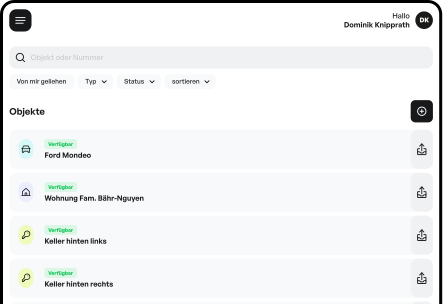
Safely documented
History of every action.
Many companies pass the same keys through many hands in quick succession. For precise tracking, Log+Key makes it easy to trace every key movement.

Intuitive and flexible
Easy integration.
As a web app, Log+Key slots easily into your existing processes — no installation required. Accessing it from multiple devices is simple. Log+Key is also a breeze to use and self-explanatory, so lengthy training for your team is unnecessary — saving you time and letting you get started right away.
Want to explore the software solution? On our overview page you’ll find comparison tables, pricing, and use cases at a glance. For the fundamentals, including a definition and selection criteria, see What is a key management system?. For an overview of all ready-made integrations, see which systems we connect.

Special requirements?
We build custom solutions too
Still missing one specific feature to cover your company’s needs? Our experienced development and design teams take on any challenge.